
Table of contents
- Quick nav
Android XR screenshot size: Google Play 8:5 at 3840×2400
The XR slot is not a wider phone screenshot
You only need an Android XR screenshot size set if you actually distribute the app to Android XR headsets on Google Play. The files sit in their own Graphics section. They are not interchangeable with phone screenshots, 7-inch or 10-inch tablet shots, Wear OS, or Android TV assets, and a 1920×1080 landscape phone image will not satisfy the written shape.
This page was checked against Google's Add preview assets to showcase your app on 9 November 2026. The Android XR paragraph is specific:
- Upload between 4 and 8 screenshots (not the phone-listing rule of at least two across device types).
- Files must be PNG or JPEG, up to 8 MB each.
- The aspect ratio is 8:5.
- Recommended resolution is 3840×2400; the minimum is 1920×1200.
3840 ÷ 2400 = 1.60, which is exactly 8:5. 16:9 is 1.78 (1920×1080). 9:16 is the familiar 1080×1920 phone canvas. Those are different rectangles. Stretching a phone screenshot sideways is not a shortcut.
A second common mix-up is file size. Many secondary guides say every Play screenshot has an 8 MB cap. On today's official page, 8 MB is written on the Android XR bullet. The general phone-screenshot rules list JPEG or 24-bit PNG (no alpha), sides between 320 and 3840 px, and a long side no more than twice the short side. They do not repeat an 8 MB limit for the phone slot. Do not fail a phone image against the XR cap, and do not drop a 16:9 phone image into the XR slot.
What the official wording actually locks
| Rule | Official wording (9 Nov 2026) | What people invent |
|---|---|---|
| When it is required | You must upload 4–8 screenshots to showcase the app on Android XR | Filling the slot even though you do not distribute to XR |
| How many | 4–8 | Reusing the phone minimum of two screenshots to publish |
| Shape | 8:5 | Dropping in 16:9 or 9:16 phone or tablet art |
| Pixels | Recommended 3840×2400, minimum 1920×1200 | Swapping the pair to 2400×3840, or uploading a smaller wide image “for now” |
| Format and bytes | PNG or JPEG, 8 MB each | A PNG that still carries alpha; or treating 8 MB as a universal Play cap |
The general screenshot requirements on the same page still apply: no alpha, longest side at most 3840 px, long side at most twice the short side. 3840×2400 sits exactly on the maximum edge and at 1.60×, so it does not trip the Google Play screenshot 2:1 rule.
The documented recommended size is 3840×2400 — wider than it is tall — which matches 8:5 as a landscape rectangle. The help page does not list a separate portrait pair. Some secondary articles write “portrait 3840×2400 / landscape 2400×3840”, which does not match 8:5: 2400×3840 is 5:8. This article does not treat an undocumented portrait size as official. If your console accepts additional pixels, the console wins.
Which files you already have will not fit
| Source | Pixels | Ratio | Valid XR screenshot? |
|---|---|---|---|
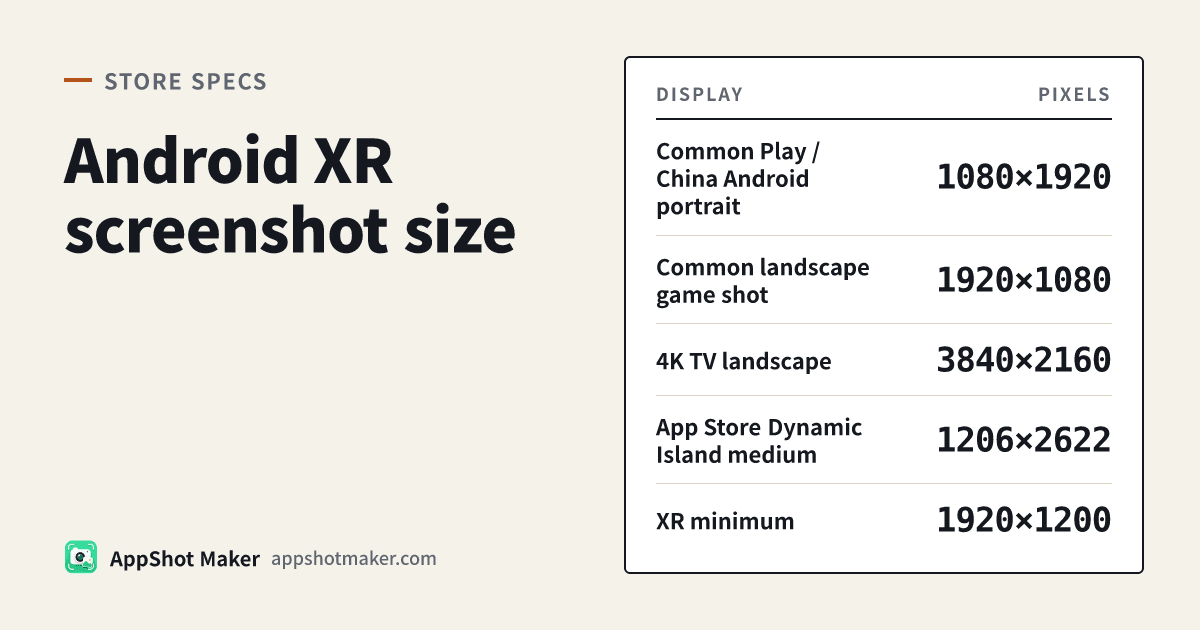
| Common Play / China Android portrait | 1080×1920 | 9:16 | No |
| Common landscape game shot | 1920×1080 | 16:9 | No |
| 4K TV landscape | 3840×2160 | 16:9 | No |
| App Store Dynamic Island medium | 1206×2622 or 1179×2556 | about 2.17 | No; it already fails the phone 2:1 cap |
| XR minimum | 1920×1200 | 8:5 | Yes |
| XR recommended | 3840×2400 | 8:5 | Yes |
Unless you have a reason to stay at the minimum, export the recommended 3840×2400. Wear OS, Android TV, and Chromebook rules live in the multi-device screenshot guide; that article does not cover XR, and XR is stricter on both shape and minimum count.
A 3840×2400 image is about 9.2 million pixels. A bulky PNG can cross 8 MB; JPEG, or a flattened canvas run through compression, usually brings it back under the line. A PNG that looks fully opaque can still carry an alpha channel, so flatten it onto a solid background or export JPEG. See the transparent screenshot reject if that warning appears.
The 1024×500 feature graphic remains required to publish a store listing. It is not an XR screenshot. Optional spatial Android XR video is a separate YouTube field (360°, 180°, or 3D) and does not replace the 4–8 stills. The help page also notes that using the feature graphic as a preview-video cover does not apply to spatial Android XR videos.
First-hand workflow: type 3840×2400 as a custom canvas
There is no dedicated “Android XR” preset on this site yet. The screenshot size chart currently lists phone, tablet, and feature-graphic rows. If you use “Reverse lookup: where can this size go?” and type 3840 × 2400, you will not get an exact table match. That does not mean Google omitted the size; the chart has not added an XR row.
- Confirm you really distribute to Android XR. If the listing is phone and tablet only, skip this set.
- Open the screenshot editor. In Size & export, do not pick the Android 1080×1920 preset. Use Custom size and enter 3840 × 2400. Layout the real XR interface, then export an opaque PNG or JPEG. Google recommends avoiding device imagery on screenshots, so leave the device frame off.
- If you already have 8:5 art and only need the recommended pixels, use batch image processing with a custom width and height of 3840×2400. When the ratio does not match, choose pad-to-fit or crop-to-fill — not stretch — and strip the alpha channel if needed.
- Image resize locks aspect ratio by default, which is fine for an already-correct 8:5 file. Unlocking the fields and forcing 3840×2400 stretches the pixels. Google asks you not to upload stretched or compressed images.
- If a PNG is near or over 8 MB, open image compression, switch to convert-to-JPG, and step quality down from 80% until the file is under 8 MB without smearing type.
- Screenshot compliance check applies the Play phone range and the 2:1 rule when you tick Google Play. A 3840×2400 file will usually read as a legal edge length with a 1.60× ratio. That only means it did not break the general phone rules. It is not a validator for XR’s 8:5 requirement, the 8 MB cap, or the 4–8 count. The checker never counts how many files you will upload.
Keep the phone set at 1080×1920 and build it in the Google Play screenshot generator. Do not overwrite one set with the other. Taglines, banned ranking words, and alt text are covered in the screenshot text rules.
Before you upload: you do distribute to XR; you have four to eight files; each file is 8:5, preferably 3840×2400; nothing has a transparent channel; each file is 8 MB or smaller; the frames show the real headset experience rather than a stretched phone UI; and the feature graphic plus phone screenshots are still in place. The broader spec sheet is in Google Play screenshot requirements 2026. If Play Console disagrees with a help-page sentence, the console wins.
Ready to design your store screenshots?
Try AppShotMaker and turn raw captures into store-ready screenshots in minutes.