
Table of contents
- Quick nav
Markdown to WeChat Free: Copy into the Official Account Editor
“Markdown to WeChat” is really about surviving the paste
The WeChat Official Account article editor does not understand Markdown. Paste a .md file or a styled web page and you usually get:
- tags and
classnames stripped, so hierarchy and spacing collapse; - native lists rewritten, so nested lists shift;
- in the article body, readers can tap only links to other Official Account articles—other URLs go dead.
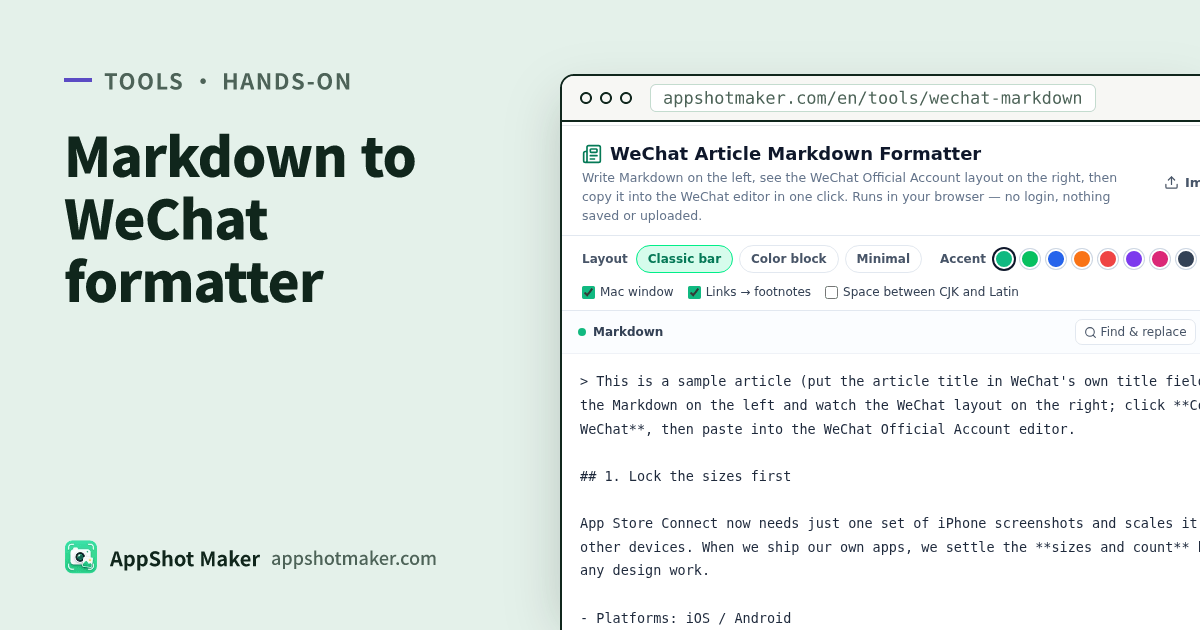
If you already draft release notes, China-store how-tos, or listing checklists in Markdown, WeChat Article Markdown Formatter is the thin converter: Markdown on the left → Official Account-width preview on the right → Copy for WeChat. Output is rich text with inline styles so the paste matches the preview as closely as the editor allows.
Checked 2 Nov 2026. Parsing uses markdown-it (MIT); highlighting uses highlight.js (BSD-3-Clause). Licenses: /vendor/wechat-md/LICENSES.txt. Layout rules are our own code.
Full editors vs a paste-and-go formatter
| Workflow you want | Better path | Why |
|---|---|---|
| Ongoing series, cloud drafts, theme marketplaces, image hosts | doocs/md-class or similar WeChat Markdown suites | Broader feature surface, often with saved drafts |
| Finish, paste, leave nothing behind in the browser | /en/tools/wechat-markdown (this article) | No login, no localStorage, close tab = gone |
| Social image cards (not article body) | Xiaohongshu / WeChat text cards | Exports graphics, not Official Account HTML |
| Store screenshot production | /en/preview or Batch processor | Different job than article formatting |
Skipping drafts is intentional. Release notes often contain unreleased version strings or internal links; the page does not persist them. Keep the source of truth in your own editor or Git.
Three WeChat rules to accept before you paste
| Rule | How the tool responds | How you write |
|---|---|---|
| Mostly inline styles survive | Headings, paragraphs, quotes, code, tables get style attributes | Do not rely on custom classes |
| Native lists get rewritten | Drawn bullets, numbers, and checkboxes replace native list markup | Check nesting in the phone preview |
| External links are not tappable in the body | Optional Links → footnotes for non-mp.weixin.qq.com URLs | Use Official Account article links when readers must tap; accept footnotes for the rest |
Images need a public  URL. After paste, WeChat rehosts them. Local relative paths will not survive—upload those in the Official Account editor.
Controls worth touching
| Control | When I use it | Watch-out |
|---|---|---|
| Layout: classic bar / color block / minimal underline | Tech notes vs product announcements | Three layouts are enough; do not chase theme count |
| Eight accent presets or custom | Match brand color | Readability beats neon |
| Body 14–17 px and line height | Long posts | Check phone preview for density |
| Light / dark code theme | Engineering release notes | Dark code on light body usually reads clearer |
| Mac-window code chrome | Optional “screenshot” feel | Not required |
| Links → footnotes | On by default for most posts | Off keeps bare links that readers often cannot open |
| CJK–Latin spacing | Mixed Chinese/English copy | Follow your house style |
Switch the preview between phone and desktop width. Judge the final pass on phone—that is how most readers open the article inside WeChat.
Syntax coverage for release notes
Supported: headings, paragraphs, bold / italic / strikethrough, inline code, fenced code blocks (common languages highlighted), quotes, ordered / unordered / nested / task lists, tables with alignment, images, rules, links.
Safety: raw HTML inside Markdown is shown as text and never executed. Do not expect custom widgets to run.
| Release-note block | Markdown tip |
|---|---|
| Version + date | H2 + short paragraph |
| What’s new | Bullets or task list |
| Size / spec tables | GFM table |
| Sample code | Fenced block with a language tag |
| Off-site docs | Footnotes, or link to an already published Official Account article |
Four steps into the Official Account editor
- Open WeChat Article Markdown Formatter. Paste Markdown, import / drop a
.md/.txt, or load the sample. - Pick layout, accent, and type size; toggle footnotes and CJK–Latin spacing; set preview to phone width.
- Click Copy for WeChat, open the Official Account article editor, and paste into the body (Ctrl/⌘ + V). Keep the title in WeChat’s own title field.
- Use WeChat’s phone preview: list nesting, table scroll, footnote numbers, and whether images rehosted.
You can also copy HTML source or download an HTML file. Most teams only need the rich-text copy path.
Adjacent production steps on this site
| Step | Tool |
|---|---|
| Format Markdown for Official Account paste | This tool |
| Multi-size store screenshots / strip alpha / ZIP | Batch processor |
| Pre-publish listing truncation check | Store listing preview |
| Poster or OG creative | Poster Studio / OG share image |
Common paste failures (and the fix)
| What you see in WeChat | Likely cause | Fix |
|---|---|---|
| Flat, unstyled text | Copied plain Markdown instead of Copy for WeChat | Use the tool’s copy button, then paste into the article body |
| Broken nested lists | Preview looked fine but you edited after copy | Re-copy from the tool; avoid hand-editing list HTML in WeChat |
| Dead outbound URLs | External links without footnotes | Enable Links → footnotes, or publish a WeChat article and link that |
| Missing images | Local file paths in Markdown | Use https URLs or upload inside WeChat after paste |
| Title duplicated in the body | Put the H1 in Markdown | Leave the title field to WeChat; start the Markdown at ## |
Teams shipping both English and Chinese release notes often keep one Markdown source per locale, run this formatter twice, and paste into two Official Account drafts. The formatter does not translate—localization still happens in your docs.
Ship checklist
- Source kept in your own editor (this page clears on close)
- Phone-width preview looks clean for code and tables
- Link strategy decided (footnotes vs Official Account internal links)
- Images are public URLs, or you will upload them in WeChat
- Official Account phone preview checked before publish
Winning Official Account formatting is less about the twentieth theme pack and more about paste fidelity, honest link behavior, and not silently caching unpublished copy. When that is the job, use this free, local, account-free page.
Ready to design your store screenshots?
Try AppShotMaker and turn raw captures into store-ready screenshots in minutes.