App Screenshot Generator — Free App Store Screenshot Maker

About this app screenshot generator
Looking for a free app screenshot generator? App Store and Google Play both need store screenshots. If you only have raw app captures, opening a design tool just to layout them costs time. Upload shots here, add titles and backgrounds, optional device frames, and export App Store screenshots ready to upload.
It is free in the browser. Backgrounds can be solid or gradient with optional texture. Fonts include Inter and several Chinese/handwriting options. Titles, colors, and sizes can be per-slide or shared. Composition stays on your device — we do not upload your shots to our servers.
Use cases
Indie refresh before review
You ship a feature and need a new 6.3″ set tonight. Pick the iPhone 6.3″ preset under Size & export, drop raw captures in Upload screenshots, rewrite titles in Title & copy, then Export all and choose PNG or JPG.
Same story, ASC + Play + China
Design once on a high-res master (6.9″ works well), then use Master multi-size export or switch the Android / Huawei / Google Play 1080×1920 preset so one narrative covers Apple and Android stores.
Outsource-friendly handoff
Agencies drop client UI captures, apply a shared background and device look across boards, then hand the zip to ASO or the store console — no Figma seat required for the last mile.
Supported sizes
Built-in presets switch the canvas to the matching pixel size:
- China Android / Huawei / Google Play: 1080 × 1920
- iPhone 6.9″: 1320 × 2868 (optional large set, good master)
- iPhone 6.3″: 1206 × 2622 (required App Store size)
- iPhone Duo Outer: 1398 × 2034 (required from April 2027 for iOS 27.1+ SDK)
- iPhone Duo Inner: 2007 × 2853 (required from April 2027 for iOS 27.1+ SDK)
- iPhone 6.5″: 1242 × 2688
- iPhone 5.5″: 1242 × 2208
- iPad 13″: 2064 × 2752
Need landscape or another iPad size? Use Custom size — exports match those pixels exactly.
How to make store screenshots here
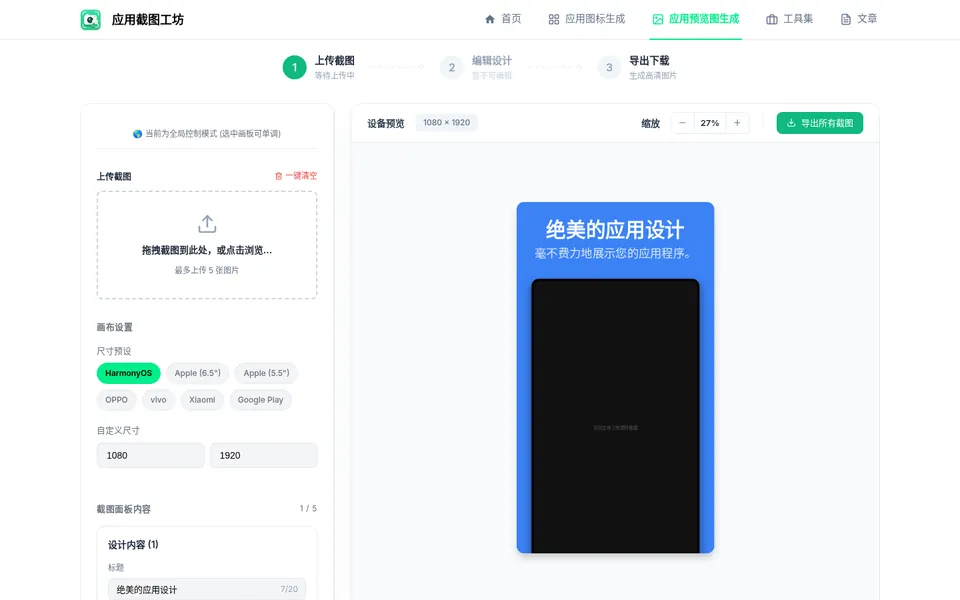
- Open Upload screenshots — drag JPG/PNG/WebP onto the boards (up to 10). Use Continue upload / replace to fix a single slide.
- In Size & export, pick a canvas preset (start with iPhone 6.3″ for ASC, or Android 1080×1920 for Play/China) or enter a custom width/height.
- In Title & copy, set the main title and subtitle; tune fonts and sizes. Optionally open Layout templates for a starting composition.
- In Background and Device look, choose solid/gradient textures and whether to compose a real-device PNG frame (same frame family as Device Mockup).
- Click Export all and choose PNG or JPG, or Master multi-size export to pack Apple 6.9″ / 6.3″ / Duo / 6.5″ plus Android 1080×1920 in one go.
Choose the right tool
For Apple screenshot sizes and preparation tips, use App Store screenshot maker for App Store requirements, and Google Play screenshot generator for Play-first workflows. Need only a transparent framed phone PNG (no marketing title stack)? Jump to Device Mockup. For pixel tables without editing, use screenshot sizes or the China Android store size guide.
FAQ
Is this App Store screenshot maker free?
Yes. All features are free to use — no watermarks and no export caps.
Do I need an account?
No. Open the page and start. Composition runs in your browser; progress stays in local storage so a refresh can resume editing.
What do I get when I export?
Choose PNG or JPG in the export dialog. One image downloads directly, and multiple images arrive in a ZIP grouped by size. The multi-size export can include (Apple 6.9″ / 6.3″ / Duo / 6.5″ + Android 1080×1920).
Which size should I submit to App Store review?
Apple’s required iPhone slot is now “iPhone with Dynamic Island (medium display)” — 6.3″, 1206 × 2622 or 1179 × 2556 — so start with the built-in iPhone 6.3″ preset. The 6.9″ preset (1320 × 2868) is optional and works well as a high-res master. From April 2027, apps built with the iOS 27.1 SDK or later also need iPhone Duo Outer (1398 × 2034) and Inner (2007 × 2853). If you support iPad, also make an iPad (13") set at 2064 × 2752.
Can I use this on a phone?
The editor needs drag/resize of multiple layers, so it is desktop-browser only for now.
How is this different from the App Store / Play screenshot tools?
/preview is the general store-screenshot editor (multi-store sizes + copy/background/device look). Use /app-store-screenshot-maker when you specifically need ASC framing, and /google-play-screenshot-generator for Play-oriented copy and sizes. All three use the same screenshot editor.
Explore more
Continue with these tools and practical guides:
Ready to export a store set?
Scroll up to the editor — upload, pick a size preset, write titles, then hit Export all. No account, no watermark.
Prefer framed PNGs only? Open Device Mockup. Need ASC-focused copy next? App Store screenshot maker.